
Uncover the specific risks introduced by unchecked files in transit; explore how MetaDefender ICAP Cloud mitigates the risks through a live demo integration.
Every time a file is moved, either through uploads, downloads, or internal sharing, an opportunity for a cyberattack appears.
Files in transit are getting the work done, being a legitimate day-to-day workflow. Users tend to trust files more when they come from known sources.
And it is precisely this trust that is exploited by malicious actors, leveraging it to penetrate environments with malware, or advanced threats, and sensitive content often enter environments through these legitimate flows.
Because traditional security controls frequently fail to deeply inspect files while in motion, organizations are exposed to risks like data breaches and compliance violations.
MetaDefender ICAP Cloud addresses this directly.
Part of MetaDefender Cloud, it uses the ICAP protocol to scan and filter content as it enters and moves through networks, including data exchanged between cloud-hosted environments and external cloud services.
With broad compatibility across ICAP-enabled gateways and fast deployment, it detects and mitigates threats without requiring infrastructure changes.
You can test out MetaDefender ICAP Cloud's capabilities onto your environment with a visit to metadefender.com. To see it in action, you only need to sign up for an API key and follow a few simple steps to simulate real integrations.
Before you do, read more about why file security in transit should be part of your file handling security protocols.
The Critical Need for File Security in Transit
Normally, files enter your constantly via authorized actions:
Uploads
Transfers
Cloud interactions
Modern threats exploit these paths: malware hides in legitimate content, zero-days evade detection, and sensitive data risks exposure.
Traditional defenses like firewalls and endpoint tools often overlook transit-phase inspection, focusing more on endpoints or already stored files.
MetaDefender ICAP Cloud solves the issue by:
Enabling automatic interception at gateways (proxies, load balancers, or WAFs). Files are then routed to a scanning service like MetaDefender Cloud, get analyzed, and only clean/compliant files continue onto their destination.
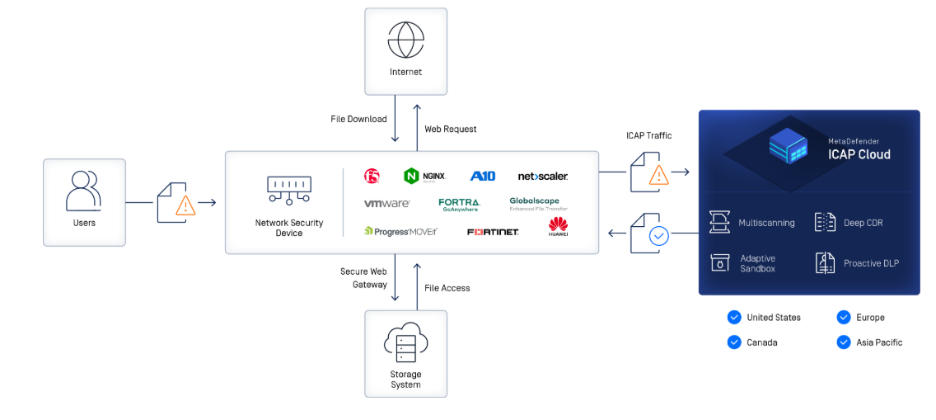
Without the ICAP's constructive interference:
Both known and unknown threats can reach networks or applications
Data breaches can occur from unfiltered flows
Compliance with regulations such as GDPR or HIPAA is in danger
The cloud-native ICAP protocol offloads processing, provides real-time protection, and scales without additional hardware.
MetaDefender ICAP Cloud: Key Benefits & Technologies
MetaDefender ICAP Cloud provides a cloud-native security layer for files in transit, delivering automated prevention, seamless integration, and enterprise resilience.
Automated threat scanning: Files transferred via ICAP requests are automatically scanned. If viruses, malware, or advanced threats are found, the infected file is blocked before reaching users or applications.
Seamless ICAP integration: Compatible with ICAP-enabled proxies, gateways, and applications, MetaDefender ICAP Cloud doesn't require changes to existing infrastructure or traffic flows.
No-code, cloud-native deployment: The service can be activated in minutes using an automated architecture, eliminating the need for complex setup or manual configuration.
Real-time, elastic scalability: Processing capacity adapts dynamically to traffic volume, ensuring consistent performance even during peak workloads.
Centralized enterprise protection: Security policies and enforcement remain consistent across all ICAP-connected environments, simplifying governance and reducing operational overhead.
High availability by design: Built-in multi-node redundancy, disaster recovery mechanisms, and multi-region support ensure continuous protection in production environments.
Technologies:
Metascan™ Multiscanning — Uses +20 anti-malware engines in parallel, combining signature-based detection, heuristics, and machine learning to achieve detection rates exceeding 99%.
Deep CDR™ — Neutralizes known and zero-day threats by removing malicious or non-compliant elements while preserving full file usability and content fidelity.
Proactive DLP™ — Inspects files for sensitive or regulated data and supports redaction or policy enforcement to meet compliance and privacy requirements.
Adaptive Sandbox with MetaDefender Aether™ — Executes suspicious files in an isolated environment to uncover hidden or advanced threats that static analysis may miss.
Predictive Alin AI™ — Next-generation static AI engine designed to assess files prior to execution by analyzing file structure and characteristics to identify potentially malicious content.
Get Started with the MetaDefender ICAP Cloud Demo
The free demo on metadefender.com lets you easily simulate an ICAP integration in a "production-like environment".
To get started, follow these steps.
MetaDefender ICAP Cloud Demo Setup
Step One
Go to metadefender.com and sign in (or create a free account) to unlock your API key and demo interface.
Step Two
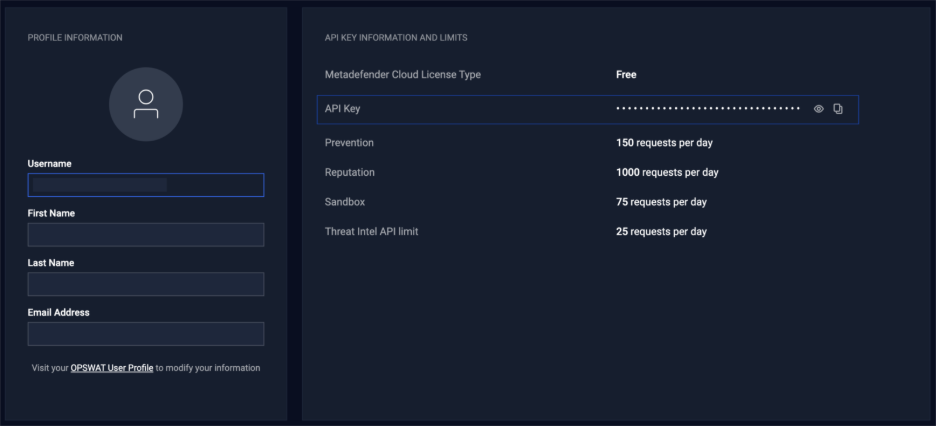
Get your API Key from the dashboard. Either click on API Keys or on "Access our docs and your API key" at the bottom. Copy your key, required for authentication.
Step Three
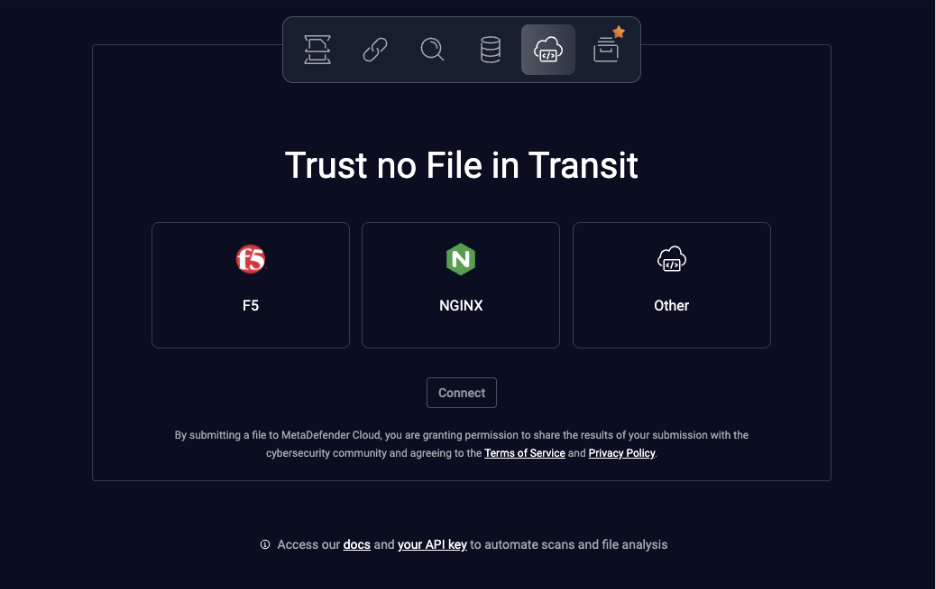
Navigate to the ICAP section to launch the demo.
Step Four
Configure your network device to forward the traffic through ICAP Cloud.
Step Five
Select one of the options and click connect: F5 / NGINX / Other (for custom)
Step Six
Review Connection Details & Authenticate After selection, view Connection Information: Ports: 11344 (standard ICAP, TLS-enabled ICAPS); 8543 (NGINX integration, HTTPS/TLS-enabled). Custom Header: X-MDCLOUD-APIKEY = [your API key]. Paste your key if needed. Secure connection uses ICAPS/mTLS encryption. For NGINX: Use HTTPS header on port 8543. For traditional: ICAP/HTTP header on 11344.
Step Seven
You can now simulate traffic, trigger sample flows, upload test files via the interface, and view results.
Files are intercepted via ICAP and scanned in the Cloud, where they pass through all MetaDefender Cloud file handling processes: Multiscanning, Deep CDR, Adaptive Sandbox, and Proactive DLP.
Only clean files proceed; threats are either blocked, or files are sanitized.
You can also check Submission History to review your scans:
File name
Scan time
Applied technologies/verdicts
Processing details
This mirrors real use and the integration with F5 BIG-IP, NGINX, proxies, and WAFs.
Why Choose MetaDefender ICAP Cloud
MetaDefender ICAP Cloud integrates with virtually any ICAP-enabled infrastructure, including legacy workflows, enabling advanced file security without requiring changes to existing environments.
As the only NGINX-certified dynamic module for advanced file security, it provides a vendor-validated solution suitable for enterprise-scale traffic.
The service is fully managed by OPSWAT, covering engine updates, infrastructure, and ongoing maintenance to reduce operational overhead.
The platform supports regional data processing to address data privacy and sovereignty requirements. Files are analyzed temporarily for security purposes and are not stored permanently.
Built on a cloud-native architecture, MetaDefender ICAP Cloud delivers scalable performance and high availability across global regions, meeting the needs of regulated, high-volume environments.
See How MetaDefender ICAP Cloud's Capabilities Apply to Your Infrastructure
If threats are capable of penetrating a system by hijacking legitimate paths and passing by unchecked, then files in transit are an ongoing risk.
MetaDefender ICAP Cloud counters with:
Real-time scanning
Multilayer defense (+99% detection, Deep CDR, Proactive DLP)
Seamless integration
No burdens in your infrastructure
For more visibility on ICAP's interception, scanning, and verdicts, explore the free demo.
Or, if you are interested in technical details, use cases, architecture, and licensing options, visit the product page.
FAQ
What is MetaDefender ICAP Cloud and how does it work?
Part of OPSWAT's MetaDefender Cloud platform, MetaDefender ICAP Cloud is designed for effortless integration with ICAP-enabled devices. MetaDefender ICAP Cloud offers a flexible approach to network, data, and application security, offering a scalable alternative to on-premises infrastructure and lowering overall operational costs.
How does MetaDefender ICAP Cloud improve file security during transit?
MetaDefender ICAP Cloud intercepts files at gateways (proxies, load balancers, or WAFs), then reroutes them to MetaDefender Cloud, where files are analyzed. Only clean/compliant files continue onto their destination.
Can MetaDefender ICAP Cloud scale to handle high volumes of file transfers?
Yes. Built on a cloud-native architecture, MetaDefender ICAP Cloud delivers scalable performance and high availability across global regions.
How does MetaDefender ICAP Cloud protect sensitive data and ensure privacy?
Intercepted files are rerouted to MetaDefender Cloud. Through the platform, the Proactive DLP technology inspects files for sensitive information such as PII, financial data, and confidential documents. If found, sensitive data is redacted.
What compliance standards does MetaDefender ICAP Cloud meet?
MetaDefender ICAP Cloud benefits from OPSWAT-managed disaster recovery, ensuring business continuity and compliance with certifications such as ISO 9001, ISO 27001, and SOC2.