
See how MetaDefender Storage Security Cloud protects your enterprise data throughout its full lifecycle, without disruption or downtime. Try it out with a demo today.
Some people look at cloud storage and see a digital data warehouse.
Others look at it as an active collaboration hub.
Whichever the case, the cloud is an active, alive infrastructure where files are constantly uploaded, shared, used, and downloaded.
And each time one uses cloud storage for file handling, they also create an opportunity:
for malware to spread
for ransomware to encrypt shared drives
for sensitive data to leak
for attackers to move laterally across environments
If they want true, functional cloud storage security, organizations need to understand that files are the new attack vector. And then act accordingly.
Multi-layered security, advanced malware scanning, deep file analysis, and sensitive data inspection are all steps which need to be included in your storage security strategy.
Let's unpack it further.
Why Advanced Storage Security Is Non-Negotiable
With cloud computing becoming mainstream in the business landscape, files are constantly moving between Microsoft 365, Google Workspace, AWS, Slack, and dozens of other SaaS platforms.
Since the cloud is where it "all" happens, cloud environments have become the backbone of modern businesses.
However, this backbone isn't built on such a strong foundation, as there's a critical flaw to it: every uploaded file is a potential entry point for an attack.
Security Gaps in Multi-Cloud Environments
Data is spread across multiple cloud platforms, in various environments with different controls and monitoring systems.
So, security becomes fragmented.
In fact, 40% of breaches span multiple environments, including cloud services, taking an average of 287 days to detect cross-cloud attacks.
Attackers can now move laterally, from email to shared drives, from collaboration tools to storage systems. If files in cloud storage aren't validated on a constant basis, malicious content can sit undetected for months.
Zero-Day Threats in Everyday Files
Most security teams rely on detection-based, traditional antivirus engines. The problem is when attacks don't rely on known malware signatures anymore.
70% of attacks use zero-day vulnerabilities, and single-engine detection tools only catch 40–60% of threats.
Detection rates aren't even close to truly catching hidden malware, especially with zero-day threats, which exploit vulnerabilities that haven't yet been patched or cataloged. A malicious document uploaded into cloud storage may look harmless to an AV, until someone opens it.
With detection rates not surpassing 60%, relying on a single antivirus scanning is essentially gambling on catching only half of the threats that enter an environment.
Modern file scanning solutions use multiple detection engines, sandboxing, and behavior-based analysis to catch what traditional tools miss.
Human Error as a Major Risk Multiplier
Not every breach can be attributed to a sophisticated hacker.
43% of them begin with a simple mistake. Simple, yet costly, with GDPR fines reaching €20 million or 4% of annual revenue. Such a mistake can look like:
employees accidentally uploading infected files
sensitive documents leaked externally
misconfigured permissions
Multi-layered security, deep file analysis, and sensitive data inspection act as a safety net against human error.
Legacy Security Infrastructure Hurting Security
Some organizations still rely on traditional, hardware-based security systems, simply paying the price in performance bottlenecks which delay cloud migration and business projects.
If security tools become expensive to maintain and difficult to scale, they become vulnerabilities.
People are inclined to bypass security steps to move workflows along and increase productivity, assuming "nothing bad can happen".
Cloud-native, multi-layered security removes the dependency on physical hardware, reduces maintenance overhead, and scales with the business.
End-to-End File Protection for Modern Cloud Storage Ecosystems
Organizations should move away from typical cloud storage protection services, which are great with access control or data backups, but lack built-in features and technologies to look at the file itself.
MetaDefender Storage Security Cloud takes a step further.
Powered by multiscanning, Deep CDR, and Sandboxing technologies, it identifies known malware as well as zero-days and emerging exploits.
Instead of treating Cloud Storage security risks as trade-offs for expansion and scalability, MetaDefender Storage Security Cloud protects the environment by looking at the most overlook attack vector: the file in itself.
How MetaDefender Storage Security Cloud Stops File-Borne Threats
Built for modern file workflows, MetaDefender Storage Security Cloud delivers flexible, scalable protection for data stored both on-premises and across cloud-based platforms.
It integrates seamlessly with most Cloud Storage solutions like SharePoint, Box, and other SaaS services, eliminating hardware dependencies and automating updates.
MetaDefender Storage Security Cloud automatically scans files, looking for viruses, malware, or advanced threats. If any of these is found, the infected file is blocked before reaching users or the environment.
Compatible with most storage security solutions, MetaDefender Storage Security Cloud doesn't require changes to existing infrastructure or traffic flows.
Once the setup is complete, it can be activated in a matter of minutes, eliminating the need for complex setup systems.
MetaDefender Storage Security Cloud Technologies
Metascan™ Multiscanning — +20 anti-malware engines used in parallel, combining signature-based detection, heuristics, and machine learning to achieve +99% detection rates.
Deep CDR™ technology — Neutralizes known and zero-day threats by removing malicious or non-compliant elements from files. The process returns a safe file without affecting file usability and content fidelity.
Proactive DLP™ — Inspects files for sensitive data. Supports redaction or policy enforcement to meet compliance and privacy requirements.
Adaptive Sandbox with MetaDefender Aether™ — Executes suspicious files in an isolated environment; uncovers hidden or advanced threats.
Predictive Alin AI™ — Next-generation static AI engine. Analyzes file structure and characteristics to identify potentially malicious content before the file is opened.
Get Started with the MetaDefender Storage Security Cloud Demo
The free demo MetaDefender Storage Security Cloud demo can be reached via metadefender.com, allowing you to easily simulate how the platform works with your storage.
To get started:
MetaDefender Storage Security Cloud Demo Setup
Step 1
Head to metadefener.com/mdss
Step 2
Select the Cloud Storage Service you're using Note: metadefender.com only supports free demos for Amazon S3, SharePoint, and AzureFiles
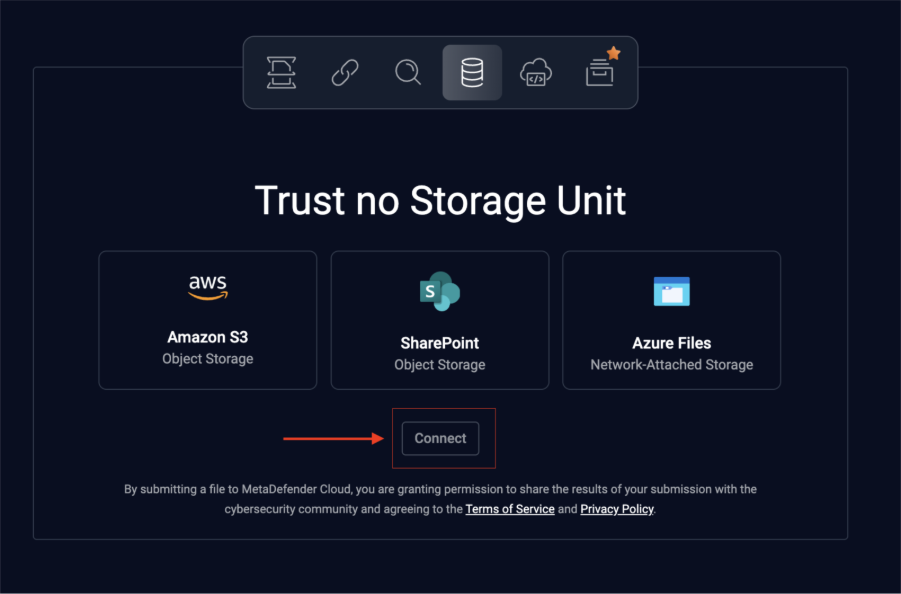
Step 3
Fill out the details (note: all details needed can be easily accessed via the documentation page)
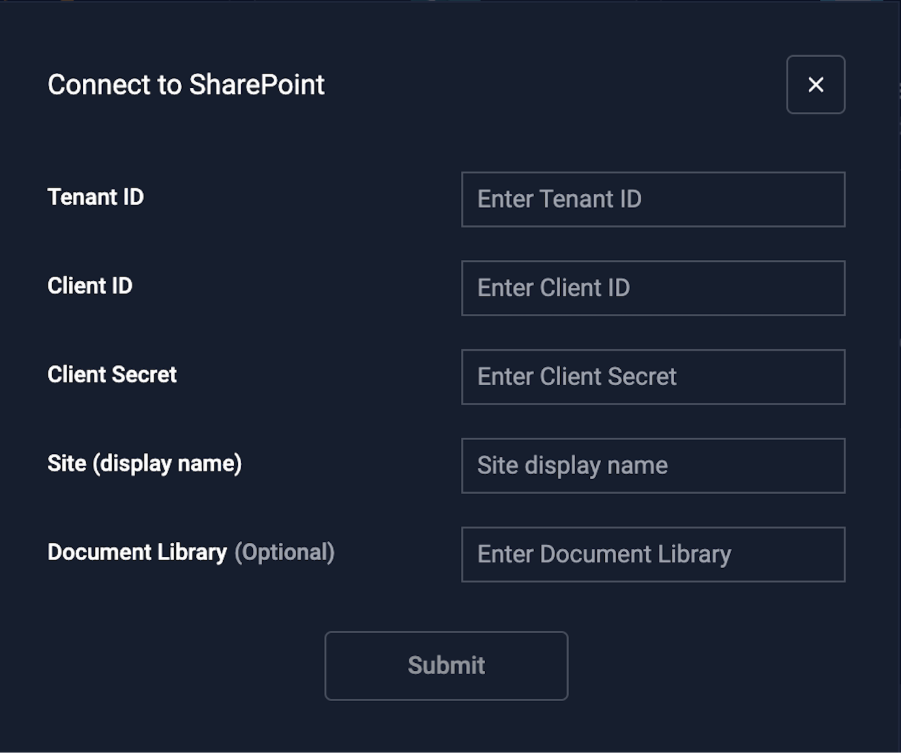
Step 4
After you click submit, your storage is connected.
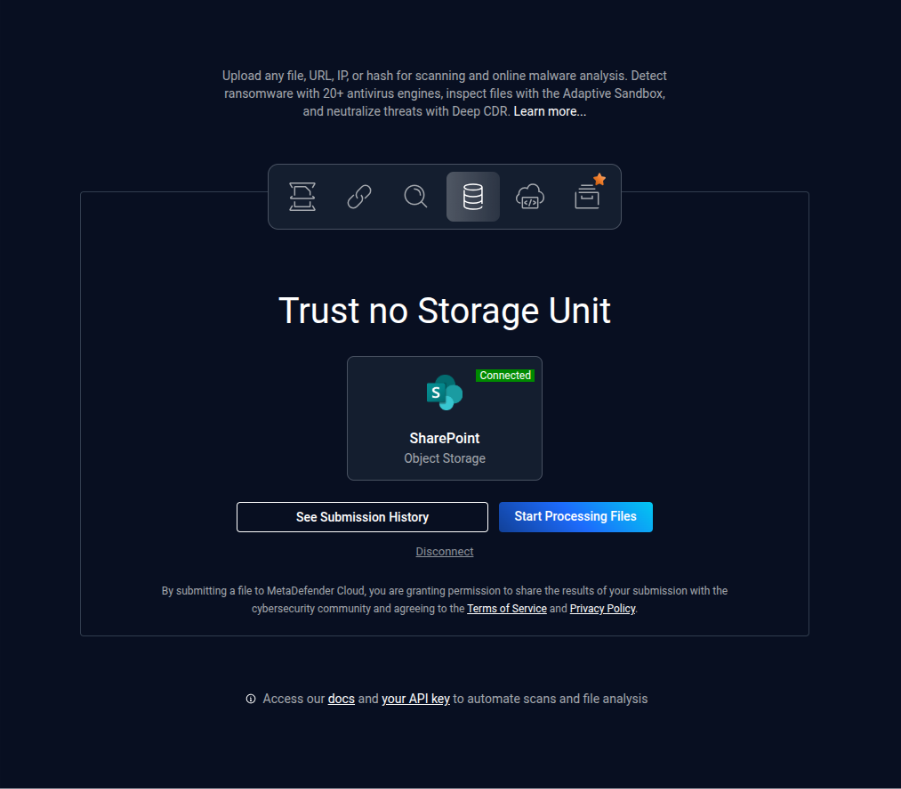
You can check out scan history anytime.
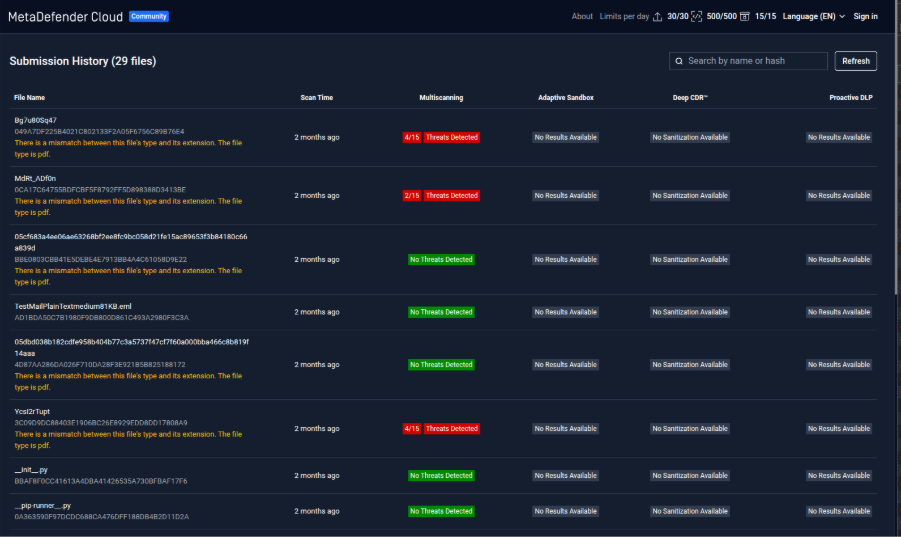
Why Choose MetaDefender Storage Security Cloud
MetaDefender Storage Security Cloud offers powerful file protection, without adding complexity or slowing down business operations.
Powered by multi-engine malware scanning, Deep CDR, predictive AI analysis, and sandbox analysis, MetaDefender Cloud moves beyond traditional detection, providing both threat identification and threat context.
The multi-layered approach identifies known malware, blocks malicious files, and proactively neutralizes hidden or zero-day threats embedded within documents and other file types.
Security stays current through automatically updated threat intelligence feeds and anti-malware signatures, ensuring continuous protection with no manual maintenance required.
MetaDefender Storage Security Cloud also strengthens compliance efforts by:
enforcing secure file handling controls
encrypting data in transit and at rest,
Protecting sensitive information and PII throughout the inspection process
With deployment in a matter of minutes, it delivers enterprise-grade cloud storage protection that is fast to implement, easy to manage, and built for today's threat landscape.
Go to metadefender.com and try it out with a demo today.
FAQ
How does MetaDefender protect files in SharePoint?
MetaDefender Storage Security Cloud supports a native SharePoint integration. Files in this environment can be inspected files as they are uploaded or downloaded. Using multiple anti-malware engines, Deep CDR, and sandbox analysis, it identifies and neutralizes threats before they can impact users or systems.
Can I use MetaDefender for AWS S3 malware scanning?
Yes. MetaDefender can be integrated with Amazon S3 to automatically analyze objects stored in your buckets. Files are scanned as part of your workflow, and any malicious content can be blocked, quarantined, or flagged based on your security policies.
How does MetaDefender prevent zero-day malware from infecting cloud files?
MetaDefender reduces the risk of zero-day threats by proactively sanitizing files. Its Deep CDR technology removes embedded scripts, macros, and other potentially harmful elements while preserving the file's usability. Hidden threats are eliminated even if they are not yet recognized by signature-based detection.
How does MetaDefender help meet regulatory and compliance requirements like GDPR, HIPAA, or SOC 2?
MetaDefender Storage Security Cloud supports compliance initiatives by enforcing strict file security controls. Through multi-engine malware detection, DLP, and file sanitization, it helps organizations demonstrate secure handling of data, protect sensitive information, and maintain audit-ready security processes aligned with regulatory standards.
How are sensitive files and personally identifiable information (PII) protected in the cloud?
The platform protects sensitive data with encryption during transfer and storage. Additionally, file analysis processes are designed to maintain strict data confidentiality, ensuring file contents remain protected throughout the inspection lifecycle.
What happens to files that are flagged as malicious?
If a file is identified as malicious, it is immediately exposed. This prevents it from being delivered to users or stored in the protected environment.
How quickly can MetaDefender be deployed across my storage environment?
Deployment is fast and straightforward. In most cases, MetaDefender Storage Security Cloud can be configured and operational in a matter of minutes, allowing organizations to start protecting their storage environments almost immediately.