
Files are the connective link of modern work, and attackers know how to take advantage of this: in 2025, Kaspersky detected an average of 500k malicious files daily. That’s approximately +182 million infected files detected by only one detection system. In a single year. Imagine the real scope.
With file-borne threats as a primary deliverer for attacks, file upload security has never been more critical.
To handle the threat, the industry has built detections, signatures, scanners, threat intelligence feeds. But every one of those tools depends on having seen the threat before, which means the first victim always pays the price.
For a better answer, we need to answer a better question: instead of asking whether a file is malicious, what if you assumed it could be?
That question has been answered by CDR (Content Disarm and Reconstruction), a more proactive approach to zero-day file protection available today. Here’s how it looks in practice.
File-Borne Threats Are Evolving Faster Than Traditional Defenses
Businesses operate on a constant flow of incoming files; contracts, invoices, forms, or job applications. Thus, files became effective trojan horses for file-borne threats: they appear safe, so people trust them. And it works. In 2024, 66% of security breaches happened because of employee oversight.
By design, traditional defenses can’t keep up:
Evasive malware grew 168% in a single year.
210,258 new malware variants emerged in a single year, averaging 637 previously unseen strains daily.
The average zero-day file-borne threat goes undetected for 208 days.
Knowing how to prevent file-based attacks means accepting one thing: if your defense depends on recognizing the threat, you will often be one step behind the attacker.
File-borne threat prevention has to be built on something else entirely. Something that doesn’t even need to detect malware; like CDR cybersecurity.
What Is CDR in File Security?
Content Disarm and Reconstruction is a proactive file sanitization technology that helps protect against file-borne threats by removing active content and rebuilding files into clean, usable versions.
Elements removed are those commonly abused by attackers: macros, embedded code, scripts, malformed objects, suspicious links, and embedded objects.
CDR is especially valuable for organizations handling files from external or untrusted sources, such as email attachments, downloads, file transfers, collaboration tools, SaaS platforms, and cloud uploads.
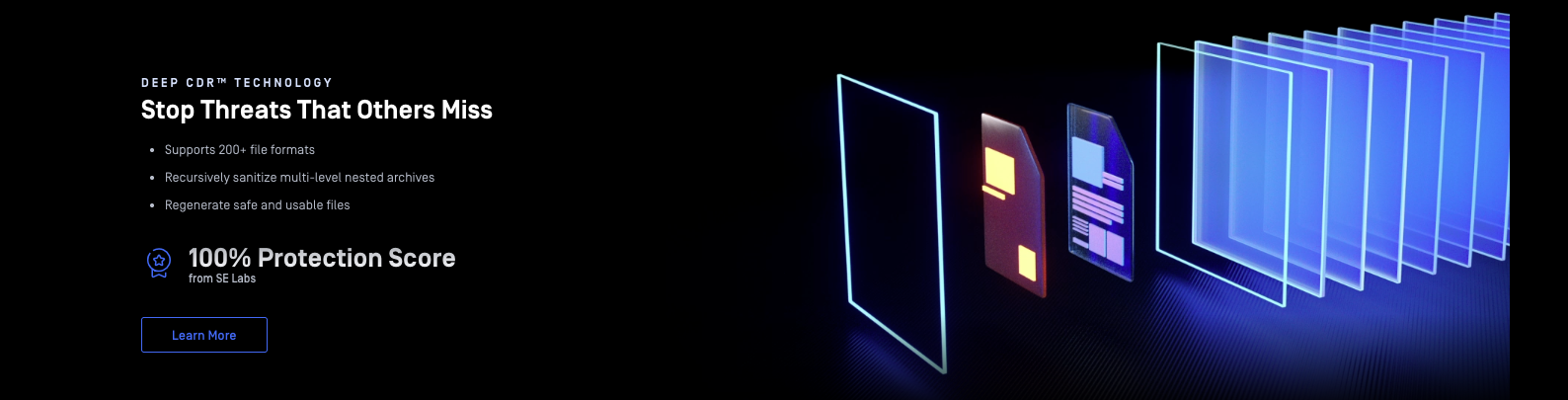
How Does CDR Work?
The “proactive” in proactive malware prevention is given by its core approach: it does not determine nor detect malware’s functionality. Instead, it removes the potential chance for malware to execute, making CDR an effective zero-day threat prevention technology. Here’s the step-by-step breakdown:
Parse the file : the CDR technology engine reads the file according to its format specification and converts it into an internal representation of its contents and structure.
Extract approved content : it keeps only content types allowed by policy (e.g., text, images, tables) and removes potentially dangerous elements; this step is essential for unknown malware prevention.
Reconstruct the file : a completely new file is generated from the sanitized content instead of modifying the original file.
Deliver the rebuilt file : users receive the reconstructed version, which preserves the intended purpose of the original file, but active content is removed.
CDR vs Malware Scanning: Detection vs Prevention
Malware scanning analyzes incoming files against a database of known threats, flagging anything that matches a recognized signature. While effective, the approach is retrospective and can’t cover all file-borne threats: it can only block what it has already seen.
Even the best malware scanning engines, with near perfect detection rates in controlled lab conditions, see those rates drop significantly in the real world. In practice, zero-day variants, encrypted delivery, and evasion techniques render signatures obsolete before they are even indexed.
CDR cybersecurity has no such limitations.
This makes it a more reliable approach to zero-day malware prevention available today, effective precisely because it does not depend on recognition.
However, there’s no competition between CDR and malware scanning. The latter is effective at catching known threats, while the former handles (almost) everything else. Together, they cover a larger spectrum of proactive malware prevention, so they should be used in tandem.
Who Needs CDR-Based File Upload Security?
The short answer: any organization that receives files from the outside world.
The longer answer: some industries are more sought-after targets than others. For them, CDR becomes a critical layer of file security.
Enterprise IT and security teams managing internal upload portals and email pipelines are the first line of defense against malicious macros and weaponized attachments. Emotet, which caused an estimated $2.5 billion in damages globally before its takedown, spread almost exclusively through Office email attachments. The attackers were targeting corporate inboxes at scale.
SaaS and cloud developers building platforms that accept user-generated content inherit every file-borne threat their users unknowingly upload. Securing file upload pipelines with CDR means that malicious content is neutralized before it ever touches the application layer, regardless of whether the threat has been seen before.
Financial and healthcare organizations operate under strict compliance requirements and handle some of the most sensitive data in existence. This makes them some of the most targeted sectors for file-based attacks.
Government and critical infrastructure face a different threat profile: highly targeted, state-sponsored attacks where zero-day file-borne threat prevention is an operational requirement.
Beyond CDR: Why Does Effective File Security Require Multiple Layers?
CDR is highly effective at removing threats and even zero-days hidden in files, but it has limitations. Since it doesn’t critically analyze the files, it can remove legitimate content such as trusted business macros, and it is not compatible with executables.
No single technology covers the full threat spectrum.
This is the belief MetaDefender Cloud™ is built on: multiple, prevention-focused specialized layers, each complementing the other’s capabilities.
How to Secure File Uploads in Cloud Applications with MetaDefender Cloud
MetaDefender Cloud is a cloud-native file security and malware analysis platform that detects, analyzes, and prevents threats.
It does so via a multi-layered tech stack, Deep CDR™ being only one of these layers; each technology covers a different part of the file security workflow:
Predictive Alin AI analyzes files without executing them; verdicts in milliseconds.
Metascan™ Multiscanning runs every file across 20+ anti-malware engines, achieving detection rates of +99% against known threats.
Where known-threat detection ends, Deep CDR begins: it deconstructs and rebuilds files through sanitization.
For files that require deeper inspection, the Adaptive Sandbox exposes malicious behavior in a secure environment. Along with the Adaptive Sandbox, Deep CDR is the zero-day layer of the stack.
Proactive DLP™ detects and redacts sensitive data before it leaves your environment.
The Threat Intelligence layer enriches every decision with continuously updated malware indicators.
MetaDefender Cloud is available at no cost, with no account needed, for individuals, security researchers, and teams that want to test CDR before committing to a paid tier. You only need to access the platform from your browser, upload the file you want, and that’s it. Explore the product documentation for the full list of file-type compatibility.
The output is a sanitized, rebuilt file ready to download, alongside a report detailing what was found and what was removed.
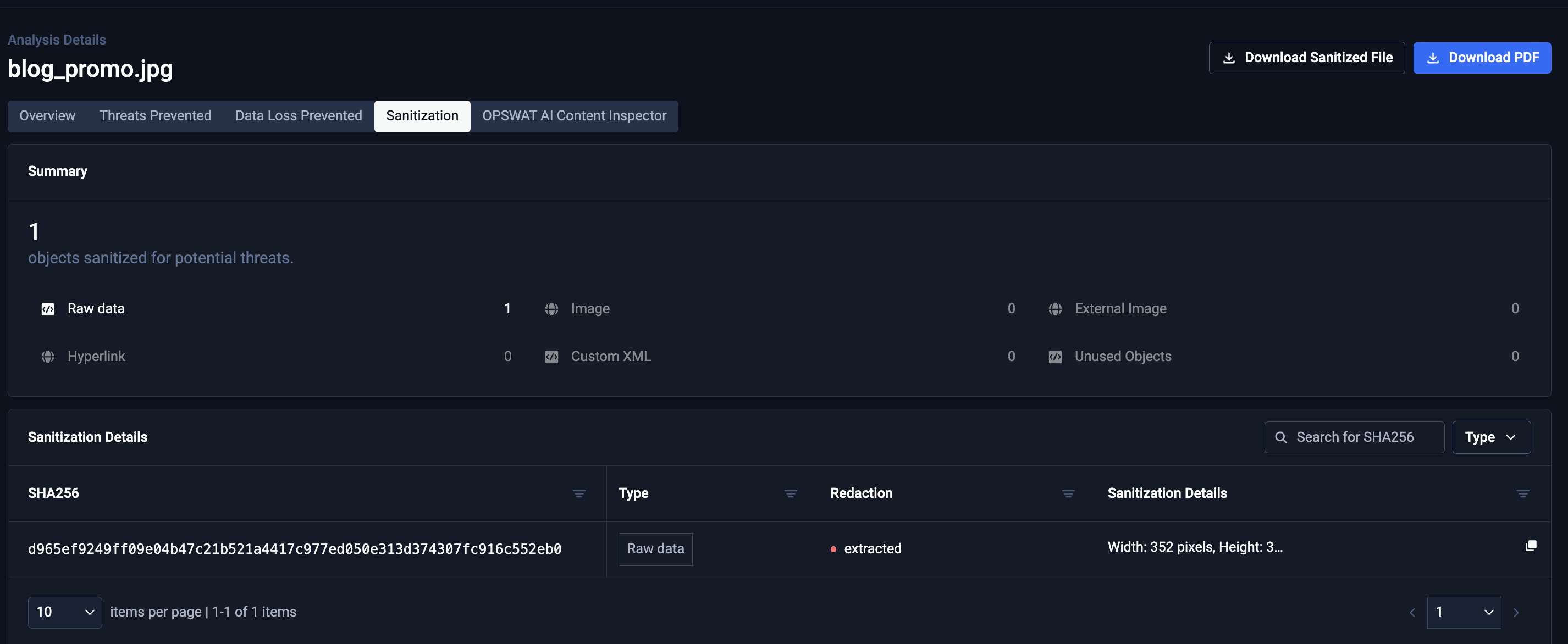
For organizations that need higher volumes, a malware scanning API, or enterprise-grade controls, paid tiers scale accordingly. But the free CDR online scanner is a fully functional starting point. If you have a file you do not fully trust, you can sanitize it right now.
Close the Detection Gap with MetaDefender Cloud’s Deep CDR Technology
Traditional scanning helps close the door on threats it already knows. But unknown variants, evasive malware, and zero-day exploits can fall outside that catalogue. That gap is exactly where proactive file protection matters.
Deep CDR reduces this risk by neutralizing active file content before detection needs to catch up. Instead of waiting for a known signature or a confirmed malicious verdict, it rebuilds the file into a clean, usable version designed to move safely through your workflow.
MetaDefender Cloud puts this logic into practice across a full multilayered stack, from Metascan Multiscanning and Deep CDR to Adaptive Sandbox, Proactive DLP™, and Threat Intelligence. It is available via API for developers and testable for free directly from your browser, with no account required.
Upload your files to MetaDefender Cloud and use the free CDR scanner to generate a sanitized, rebuilt version.
Frequently Asked Questions
What is CDR (Content Disarm and Reconstruction)?
Content Disarm and Reconstruction (CDR) is a file sanitization technology that removes active content such as macros, scripts, and embedded code, then rebuilds files into clean, usable versions. Because it does not rely on malware signatures, CDR is effective against unknown and zero-day file-borne threats.
How does CDR work?
First, the CDR technology engine reads the file, creating a representation of its contents and structure. It then extracts approved content, removing everything which shouldn’t be there (macros, embedded code, scripts, malformed objects, suspicious links, etc.). It then reconstructs the file from the sanitized content, delivering fully usable files to users.
CDR vs Antivirus: What’s the Difference?
Antivirus engines detect and block known malware, based on public signature databases, while CDR proactively strips out all active and potentially dangerous elements to rebuild a safe, clean version of the file. While the antivirus is detection-based, the CDR technology is prevention-based.
Can CDR Help Prevent Zero-Day and AI-Generated Malware?
Yes. CDR removes active content without first determining whether it is malicious. By neutralizing potentially dangerous elements before execution, it can help prevent file-borne zero-day exploits and AI-generated malware from reaching users and applications.
How does CDR handle encrypted or password-protected files?
Some CDR technologies can sanitize encrypted or password-protected files if they are provided with the decryption key or password; if not, they cannot process the file’s contents.
Will CDR break my files or remove legitimate content?
CDR doesn’t break files; it rebuilds them into fully usable versions. However, because it removes content without first determining whether it is malicious, it may also remove legitimate content.
What file types does CDR support, and does it work on executables?
Deep CDR supports productivity files such as Microsoft Office documents, OpenDocument files, PDFs, email files, images, CAD and engineering files, GIS data, archives, and many other file formats. However, CDR is generally not designed to sanitize executables, which typically require additional analysis technologies such as sandboxing.
Is there a free CDR tool I can try?
Yes. MetaDefender Cloud allows you to sanitize files using its Deep CDR technology at no cost and without requiring an account. Deep CDR is part of MetaDefender Cloud’s multi-layered file threat prevention and detection capabilities. Visit metadefender.com to try Deep CDR.
Can Developers Integrate CDR Through an API?
Yes. MetaDefender Cloud provides API-based access to Deep CDR, enabling developers to add file sanitization capabilities directly into applications and file upload workflows.
Why Is CDR Important for AI Applications?
AI systems and copilots often process files automatically and cannot inherently distinguish sensitive or malicious content. CDR helps reduce risk by neutralizing active content before files are ingested by AI workflows.